> For the complete documentation index, see [llms.txt](https://help.spicegems.com/llms.txt). Markdown versions of documentation pages are available by appending `.md` to page URLs; this page is available as [Markdown](https://help.spicegems.com/evs-easy-variation-swatches/integration.md).
# Integration
Test the EVS app functionality on Published or Unpublished themes
In this section, you can test the EVS app functionality on your unpublished theme without interrupting your live theme.
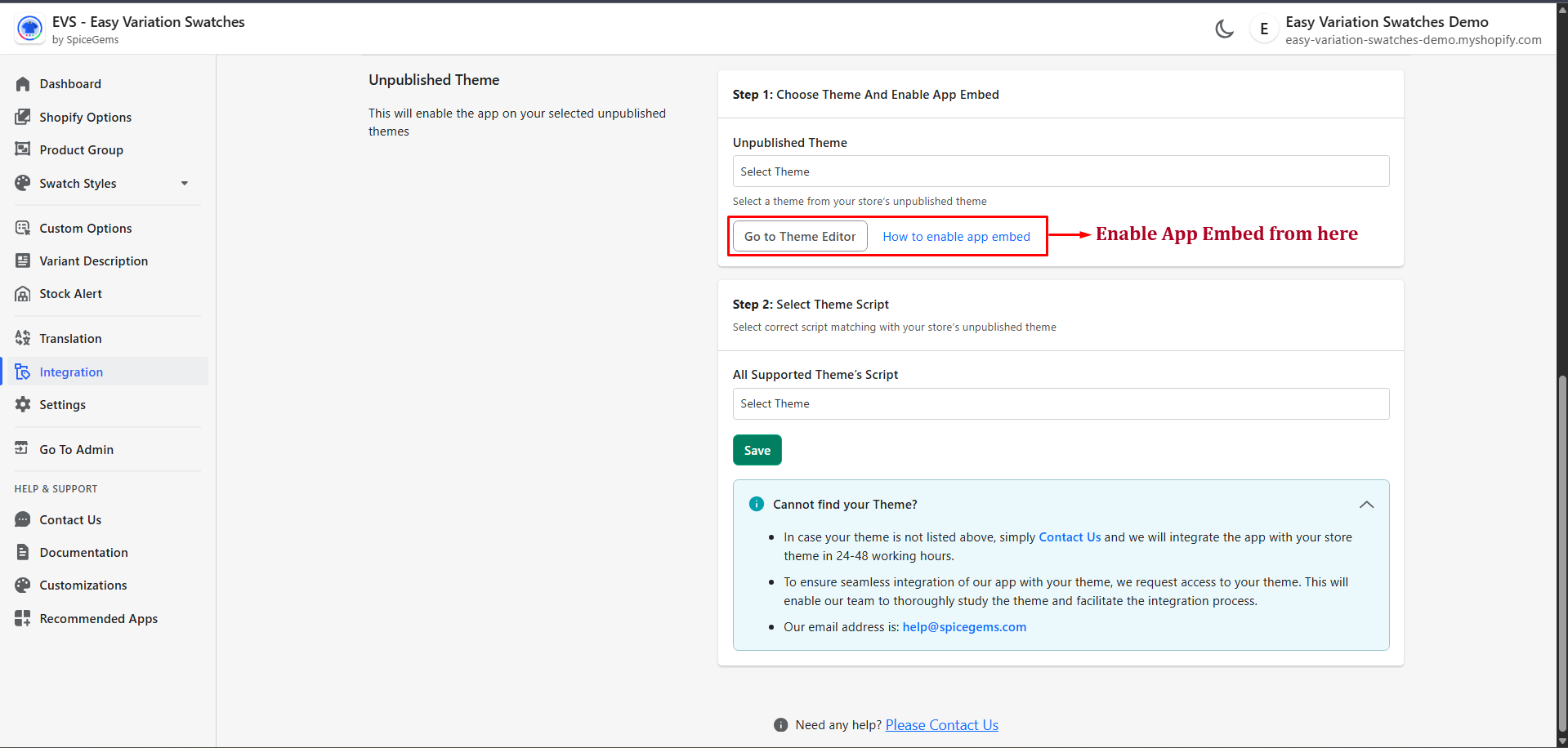
## Unpublished Theme:
### Step 1: **Choose Theme**
* Go to **EVS App → Integration → Unpublished Theme**.
* Select your unpublished theme from the dropdown.
### **Step 2: Enable App Embed**
* Click **Go to Theme Editor**.
* In Shopify Theme Editor → **App embeds** → Toggle **EVS ON**.
* Save changes.
### **Step 3: Select Theme Script**
* Back in EVS → under **Step 2**, select the script matching your theme (e.g., Dawn).
* Click **Save**.
### **Step 4: Preview & Test**
* Click on the Preview Icon in the unpublished theme section.
* Check swatch functionality on the **Product** and **Collection** pages.
{% hint style="info" %}
**If Issues:**
* Confirm app embed is ON and correct script is saved.
* Clear browser cache/incognito test.
* If the *theme is not listed*, click on Contact Us or send an email to **.**
{% endhint %}