# Return Form Integration

## **1. Create the RMS Template**

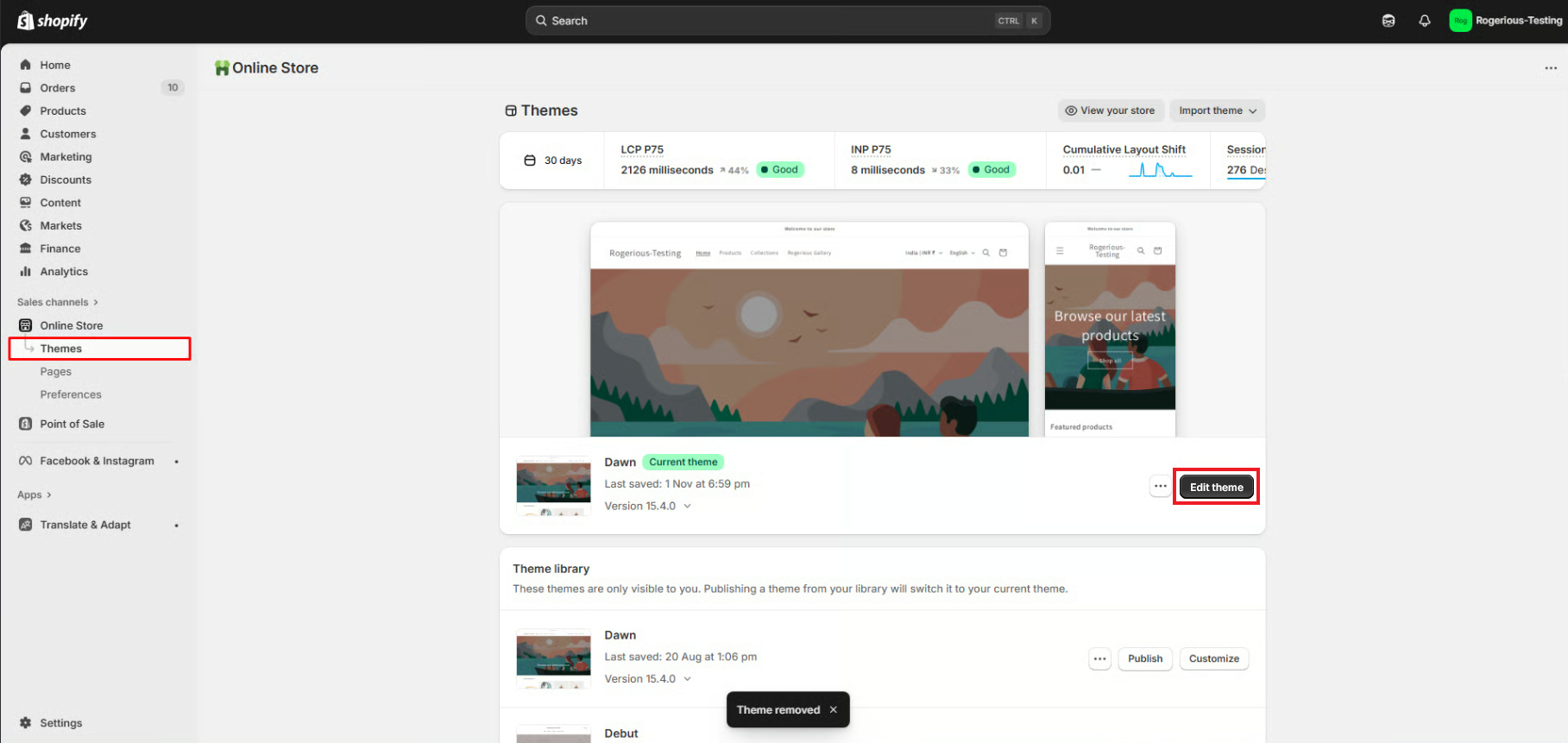
* Go to **Shopify Admin → Online Store → Themes** and click **Edit theme** on the live theme.

<figure><img src="https://412634579-files.gitbook.io/~/files/v0/b/gitbook-x-prod.appspot.com/o/spaces%2Fo4VRpaMyH68y67sWpiKA%2Fuploads%2FK1BUE6B8YeinPpBH4T2t%2FRMS_Lookup.png?alt=media&#x26;token=f553c066-8f7e-4b4b-ab65-03ec613c09bf" alt=""><figcaption></figcaption></figure>

* From the top dropdown, select **Homepage**, then switch to the **Pages** section.

<figure><img src="https://412634579-files.gitbook.io/~/files/v0/b/gitbook-x-prod.appspot.com/o/spaces%2Fo4VRpaMyH68y67sWpiKA%2Fuploads%2FGquqgsw4vl5Y3k0nEf4e%2FScreenshot_2.png?alt=media&#x26;token=7ee834cb-91ea-47cf-b678-0fea43baf6d6" alt=""><figcaption></figcaption></figure>

* Click **Create Template**.

<figure><img src="https://412634579-files.gitbook.io/~/files/v0/b/gitbook-x-prod.appspot.com/o/spaces%2Fo4VRpaMyH68y67sWpiKA%2Fuploads%2FtPYaZD1f4jUBiHwwbDIx%2FScreenshot_3.png?alt=media&#x26;token=e22bb24d-4e96-46b4-ab56-beee6efad874" alt=""><figcaption></figcaption></figure>

* Enter a name for your new template.

<figure><img src="https://412634579-files.gitbook.io/~/files/v0/b/gitbook-x-prod.appspot.com/o/spaces%2Fo4VRpaMyH68y67sWpiKA%2Fuploads%2FQGFTmaJU4WtbTFk40Sea%2FScreenshot_4.png?alt=media&#x26;token=31cf69de-4050-4414-9184-b8df51daff23" alt=""><figcaption></figcaption></figure>

* In the **Apps** section, click **+ Add block** and select the **Return Management System** block.

<figure><img src="https://412634579-files.gitbook.io/~/files/v0/b/gitbook-x-prod.appspot.com/o/spaces%2Fo4VRpaMyH68y67sWpiKA%2Fuploads%2FnZZ77YYC70BgQ6ChErDb%2FScreenshot_5.png?alt=media&#x26;token=74ab68c8-c1e4-4718-83f1-d8f66c93122e" alt=""><figcaption></figcaption></figure>

* Rearrange the block position if needed.
* Click **Save**.

<figure><img src="https://412634579-files.gitbook.io/~/files/v0/b/gitbook-x-prod.appspot.com/o/spaces%2Fo4VRpaMyH68y67sWpiKA%2Fuploads%2FsHPfN3MCAseXTBF7BgM3%2FScreenshot_6.png?alt=media&#x26;token=2b8cf395-ef0f-400b-a3df-75e41b98be91" alt=""><figcaption></figcaption></figure>

## **2. Assign the Template to Your Returns Page**

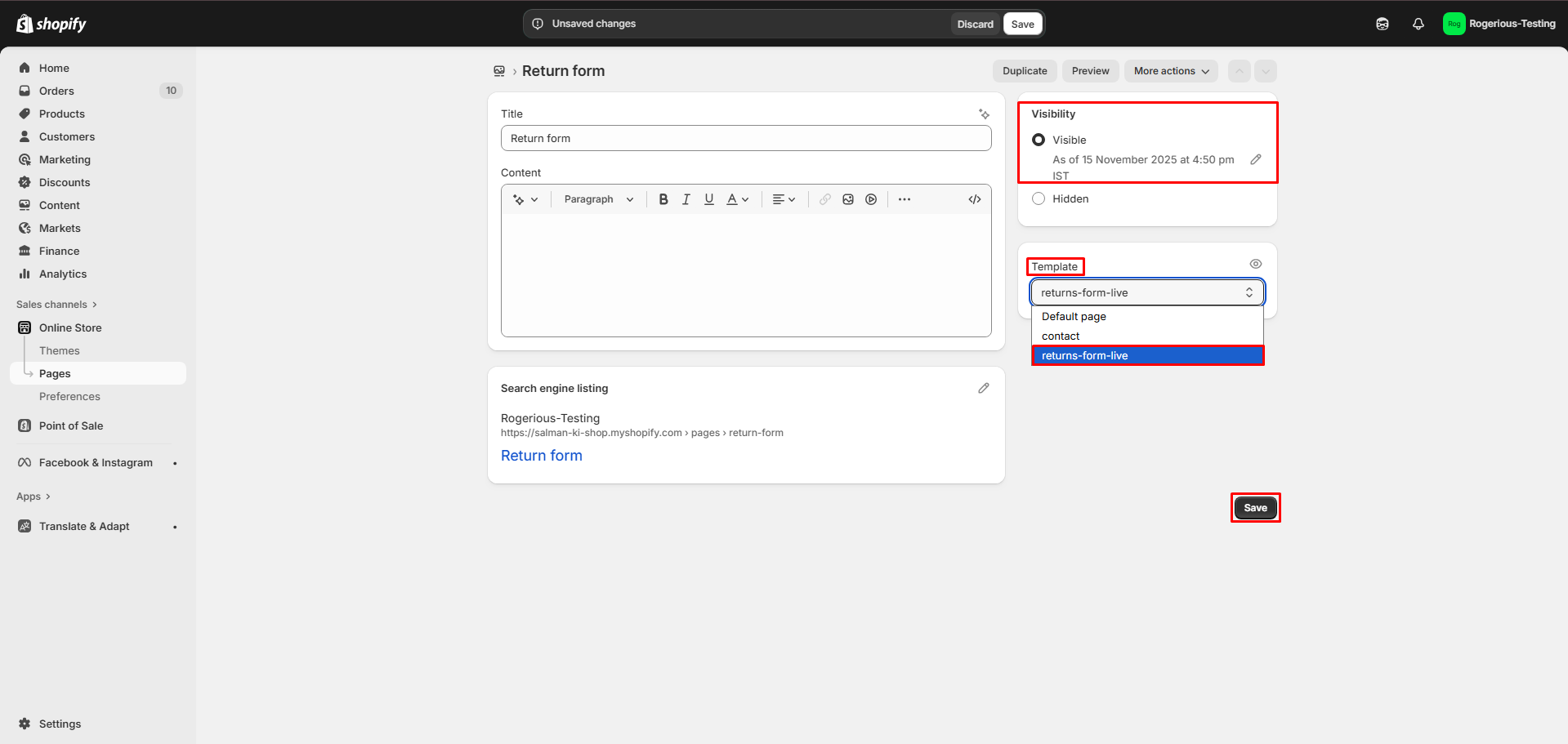
* Go to **Shopify Admin → Pages** and open your Returns page.

<figure><img src="https://412634579-files.gitbook.io/~/files/v0/b/gitbook-x-prod.appspot.com/o/spaces%2Fo4VRpaMyH68y67sWpiKA%2Fuploads%2FikqcFe23H822CYkekaVa%2FScreenshot_1.png?alt=media&#x26;token=f7a20541-20ea-48de-af19-f011ef5270d5" alt=""><figcaption></figcaption></figure>

* Assign the newly created **RMS template** to this page.

<figure><img src="https://412634579-files.gitbook.io/~/files/v0/b/gitbook-x-prod.appspot.com/o/spaces%2Fo4VRpaMyH68y67sWpiKA%2Fuploads%2FOhFBc5r1hd6RdgpkM0wW%2FScreenshot_2.png?alt=media&#x26;token=53857458-a3dc-46c7-98b2-117abfa53c82" alt=""><figcaption></figcaption></figure>

## **3. Add the Returns Page to Navigation**

* Go to **Shopify Admin → Content → Menus**.

<figure><img src="https://412634579-files.gitbook.io/~/files/v0/b/gitbook-x-prod.appspot.com/o/spaces%2Fo4VRpaMyH68y67sWpiKA%2Fuploads%2FrWSFfmblzAPdrSeawjpB%2FScreenshot_3.png?alt=media&#x26;token=3f4dda64-566d-493b-9e1a-8bb2bf76be6d" alt=""><figcaption></figcaption></figure>

* Add the Returns page to your preferred menu (e.g., Main Menu or Footer Menu).

<figure><img src="https://412634579-files.gitbook.io/~/files/v0/b/gitbook-x-prod.appspot.com/o/spaces%2Fo4VRpaMyH68y67sWpiKA%2Fuploads%2F3vfCtCl7LNCsVBxuwZqD%2FNavigation.gif?alt=media&#x26;token=974eb03f-08bc-4bde-af70-c7d1ca7ee663" alt=""><figcaption></figcaption></figure>

## **4. Final Output**

The Returns Form is now successfully integrated into your store, allowing customers to submit return requests directly from the storefront.

<figure><img src="https://412634579-files.gitbook.io/~/files/v0/b/gitbook-x-prod.appspot.com/o/spaces%2Fo4VRpaMyH68y67sWpiKA%2Fuploads%2Fmj8q799UFsuryf6jMwmA%2FFinal-view.png?alt=media&#x26;token=d551f6e3-7ae4-450b-9856-3d6e46a81a26" alt=""><figcaption></figcaption></figure>

If you need any help integrating the Return Form, please drop us an email on <help@spicegems.com>